
How to Record Audio?
CyberPower Audio Editing Lab provides a full ranged solution for almost all workflow in audio editing, audio recording and audio converting field. It is also digital audio recorder designed for …

CyberPower Audio Editing Lab can digitize sound recordings of music cassette tapes, vinyl LPs, or videos so they can be recorded onto CD. With the Sound Recorder you can digitize recordings to your computer’s hard disk, creating standard digital sound files. Timer and input level triggered recording included.
 Relax and record with TimerRecord
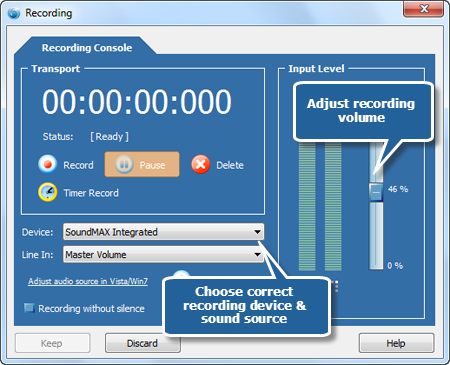
The timer record feature allows you to start and stop recording after a certain period of time or depending on the presence of an input signal. You can choose to start the recording immediately (after clicking the Start Timer Record button), at a certain time and date or when an input signal is present. The recording can also be stopped automatically, either after a certain period of silence or after a certain period of time.
Powerful “Recording without silence” featureThe recording dialog in CyberPower Audio Editing Lab also offers some advanced settings: Recording without silence: If signal is below the Attack Level for more than Attack Time, beginning of that spot in the audio will be considered beginning of silence. If signal is above the Release Level for more than Release Time, beginning of that spot in the audio will be considered end of silence.
Smart audio input controlHear what you are recording! Use the “Smart audio input control” you can easily check that the input level is in the correct range. You can adjust the input level using the input level slider. The input level meter shows the current input level. If you have connected your audio equipment and started playback, the meter should show a constantly changing input level. If the level is low and not changing, there is probably something wrong with the connection or the wrong input line is selected. You can usually choose between several different input lines, like microphone or line in.

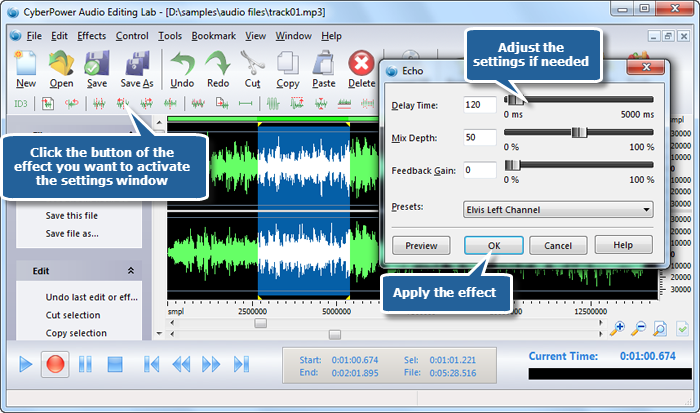
This sound editing software is a full featured professional sound editor for Windows. It lets you make and edit music, voice and other audio recordings. When editing audio files you can cut, copy and paste parts of recordings and, if required, add effects like echo, amplification and noise reduction. Real-time effect preview is also supported.
Large range of high quality audio tools and effects are integrated in Audio Editing LabAudio Editing Lab including tools for dynamic processing, equalizing, numerous effects such as echo, amplification, noise reduction, reverb, chorus and flanger, as well time stretching and key transposition tools. Recordings distorted by noise, clicks, crackle, clipping or missing high frequency content can be restored.
Real-time effect preview is supportedWith Audio Editing Lab you can easily edit a recording. Real-time effect preview is also supported. High-speed rendering and real-time performance mean less waiting and more time for creating.
Multiple Document Interface for working with many files in one sessionAudio Editing Lab supports multiple windows or MDI documents (multiple document interface). Allowing the use of different windows simultaneously, the work that have to be done gets easier. Working with a program that does not support MDI, means that multiple sessions of the same program must be opened to interact between two or more waves, but using a MDI program, there is no need to open more than one session of the program, because as many files as wanted can be opened from it, and they will be displayed in their respective child windows.

Batch processing supports up to 32000 files allowing you to reduce noise, apply effects like echo and/or convert your files as a single function.

Includes its own CD ripper with “ultra fast” rip mode and CDDB music database lookup. You can easily backup your music CDs to your HDD.

Real-time analyzer lets you analyze the output audio like a professional. Text-to-speech tool can convert your text documents to audio files, so you can listen to your documents on regular stereo, car CD players and PocketPC, or integrate spoken audio into your product presentations.

Supports for bookmarks and region markers. Regions can be saved as separate files. CyberPower Audio Editing Lab works as a wav editor or mp3 editor but it also supports a number of other file formats including WMA, MP2, VOX, GSM, DSP, CDA, AIFF, AU, RAW and more.
CyberPower Audio Editing Lab is audio editing software that’s quickly making improvements to allow its ratings to climb even higher. We thought it was a solid program that got the job done, and it has the extra features and options in its current version to have real staying power. You’re going to enjoy using this audio editing software.


CyberPower Audio Editing Lab provides a full ranged solution for almost all workflow in audio editing, audio recording and audio converting field. It is also digital audio recorder designed for …
Is it possible to “convert” DRM protected WMA files? Technically, no. In many cases, it is illegal to circumvent Microsoft’s protection in order to convert WMA files protected with Digital …
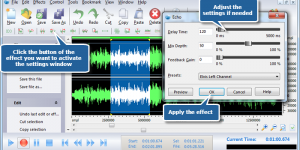
CyberPower Audio Editing Lab is a full featured professional audio and music editor which supports many advanced and powerful operations with audio data. This software lets you make and edit …
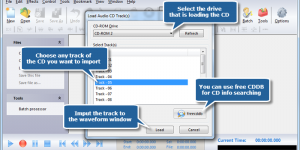
CyberPower Audio Editing Lab, feature-rich audio editing software, provides you a built-in audio loader to help you load audio tracks from an audio CD to your computer. With this professional …
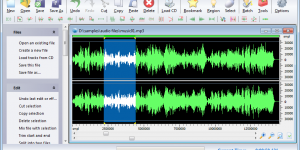
Multifunctional Recording and Editing CyberPower Audio Editing Lab is a full featured audio editor that meets all your demands of recording and editing audio. You can record sound from any …