
CyberPower Audio Editing Lab, feature-rich audio editing software, provides you a built-in audio loader to help you load audio tracks from an audio CD to your computer. With this professional tool, you can digitally import audio data from audio CDs with most CD-ROM readers and create multimedia sound tracks without hassle.
What is Audio CD?
The logical format of an audio CD (officially Compact Disc Digital Audio or CD-DA) is described in a document produced by the format’s joint creators, Sony and Philips in 1980. The document is known colloquially as the “Red Book” after the color of its cover. The format is a two-channel 16-bit PCM encoding at a 44.1 kHz sampling rate per channel. Four-channel sound is an allowable option within the Red Book format, but has never been implemented. Monaural audiohas no existing standard on a Red Book CD; mono-source material is usually presented as two identical channels on a“stereo” track.
Audio CD Loading Guide
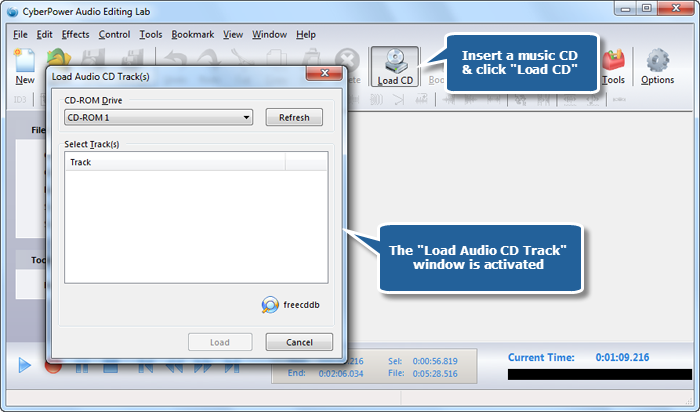
1. Launch CyberPower Audio Editing Lab. Insert a music CD to the disc drive. Click “Load CD” and the “Load Audio CD Track” window pops up.
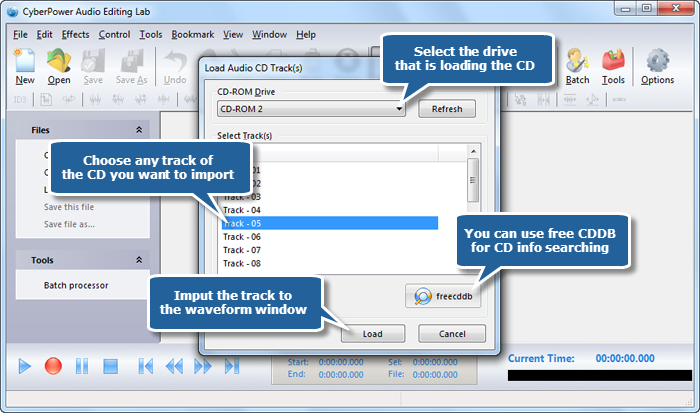
2. Choose the device that contains your source audio CD from the “CD-ROM Drive” drop-down list and all the available tracks will be listed in track list. Then, select the track you want to import and click “Load” button to input the track to the waveform window (Use “freecddb” for online CD information searching if needed).
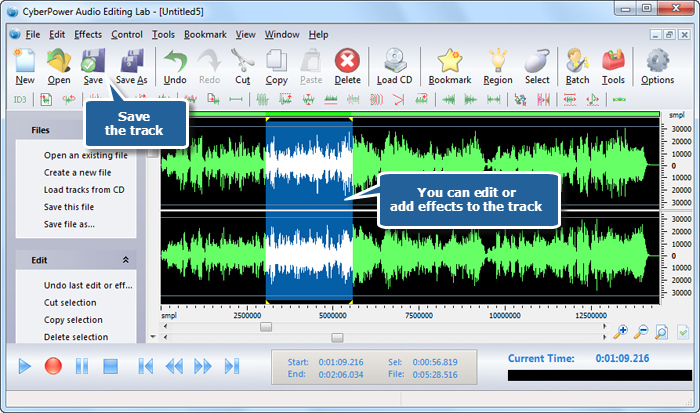
3. The imported audio track will be loaded to the waveform window. You can edit the track to meet your demands and add some cool audio effects to create wonderful music. To directly save the track, just click “Save” button. You can choose an output format and specify the output quality.
You can use this tool to rip an audio CD track to your computer, but if you have more than one track to rip, we suggest you go to “Tools – Audio CD Ripper” to batch rip them.