|
Home >
CyberPower Products
CyberPower Products
The Software Family We Offer
Free
MP3 WMA OGG Converter™
Convert your favorite audio files between MP3, WAV, WMA, M4A, FLAC,
M4R, AIFF, OGG, AAC, AMR, etc. 100% Free!
Audio Conversion
Free Mp3/Wma/Ogg Converter is an ideal all-in-one tool to convert
batches of audio files for audio CD burning and music player enjoyment.
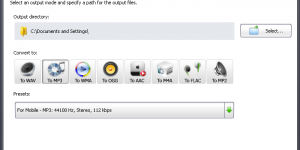
With this powerful audio converter, you can convert audio files
from one type to another while maintaining high audio quality, audio
output of MP3, WMA, WAV, OGG, AAC, M4A, FLAC and MP2 are supported.
Video to Audio Conversion
Want to listen to sweetening music from a movie on your music
players anytime? Free Mp3/Wma/Ogg Converter is just on your target.
It perfectly converts video to audio with high output quality in
a simple way. The supported video formats include AVI, MPEG, WMV,
MP4, FLV, MOV, HD, plus many others.
Customizable Output Quality
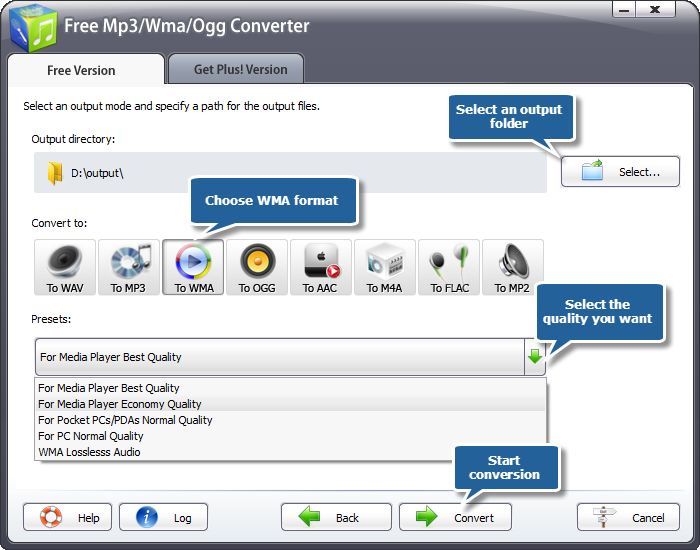
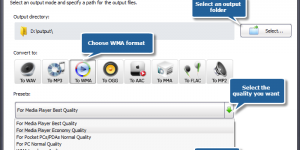
Many well-configured presets are provided by this smart music
converter to enable you to customize the parameter for output files
according to your own preference: frame rate, bit rate, resolution,
etc. The default parameters of every format work in most cases and
you can change them easily to best meet your needs.
Fast Conversion
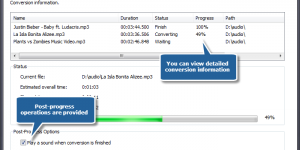
With the inbuilt batch conversion engine, you can increase performance
in case of mass conversion. The support for batch conversion process
makes your audio conversion faster and handier. The support for
multi-core processor brings you smooth and efficient decoding, simultaneous
conversion of multiple media files with fast speed.
Ease of Use
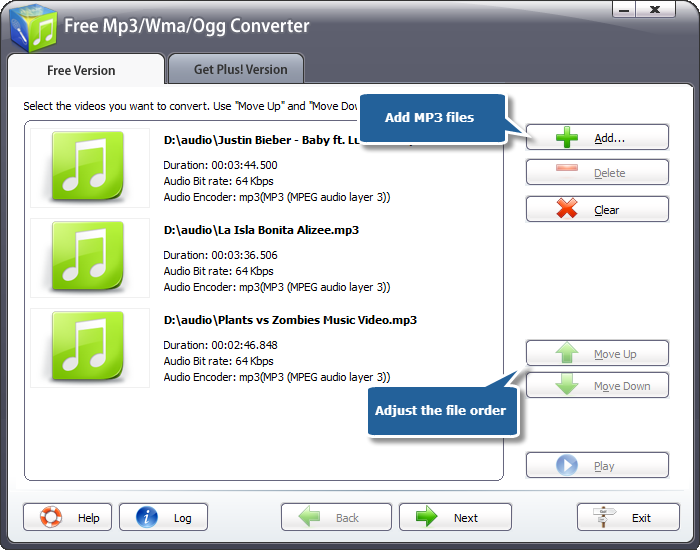
Free Mp3/Wma/Ogg Converter supplies an explorer-like interface
that helps you find every button easily. The wizard mode will guide
you step by step and all you need to do is to click "Next".
Drag-and-drop function allows you to complete the conversion only
with a few clicks.
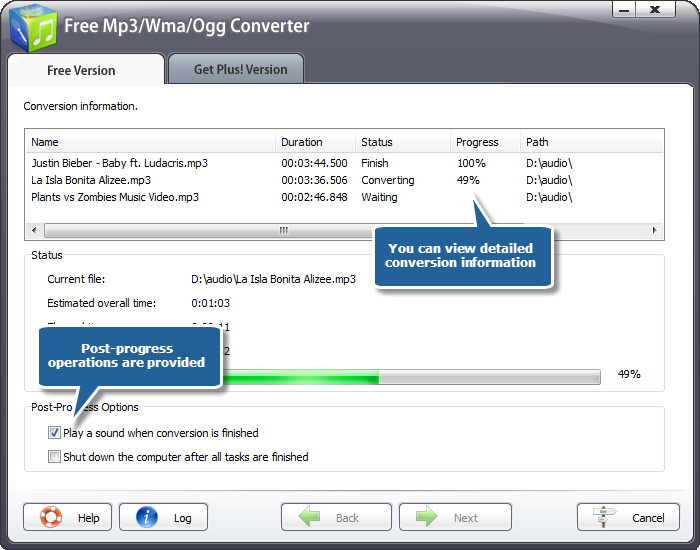
Savable log files
You can view the log information of every operation and save
them to your local folder in TXT or LOG format for professional
analysis.


CyberPower
Audio Editing Lab™
Import or record audio, cut audio, apply cool effects and save to
different audio formats.
Audio Recording
CyberPower Audio Editing Lab can digitize sound recordings of
music cassette tapes, vinyl LPs, or videos so they can be recorded
onto CD. With the Sound Recorder you can digitize recordings to
your computer's hard disk, creating standard digital sound files.
Timer and input level triggered recording included.
Easy Editing
This sound editing software is a full featured professional sound
editor for Windows. It lets you make and edit music, voice and other
audio recordings. When editing audio files you can cut, copy and
paste parts of recordings and, if required, add effects like echo,
amplification and noise reduction. Real-time effect preview is also
supported.
Batch Processing
Batch processing supports up to 32000 files allowing you to reduce
noise, apply effects like echo and/or convert your files as a single
function.
Built-in CD Ripper
Includes its own CD ripper with "ultra fast" rip mode
and CDDB music database lookup. You can easily backup your music
CDs to your HDD.
Spectral Analysis (FFT) and Speech Synthesis
(Text-to-Speech)
Real-time analyzer lets you analyze the output audio like a professional.
Text-to-speech tool can convert your text documents to audio files,
so you can listen to your documents on regular stereo, car CD players
and PocketPC, or integrate spoken audio into your product presentations.
Easy to Use Bookmark and Region Manager
Supports for bookmarks and region markers. Regions can be saved
as separate files.
Multiple Formats Support
CyberPower Audio Editing Lab works as a wav editor or mp3 editor
but it also supports a number of other file formats including WMA,
MP2, VOX, GSM, DSP, CDA, AIFF, AU, RAW and more.


CyberPower
Video Switch™
Convert between most known video files: AVI, MPEG, DVD, WMV, 3GP,
FLV and more.
Video Conversion for Various Use
CyberPower Video Switch allows you to convert video files with
a great deal of popular video formats to MPEG, WMV, AVI and other
popular formats as common standard definition videos (MP4, FLV,
3GP, ASF, MOV, etc.) and high definition videos ( MTS, M2TS, HD
AVI, etc.) with perfect output quality. It also supports a variety
of multimedia devices such as iPod, iPhone, iPad, Apple TV, PSP
for mobile entertainment.
Video to Audio Conversion
CyberPower Video Switch is an all-round video converter helps
you convert video to audio without hassle. Converting multifarious
video files to audio formats such as MP3, WMA, WAV, AAC, OGG and
so on or extracting audio from a video is can all be done in a matter
of clicks. Enjoy sweetening songs on your MP3 player is no longer
a problem!
Optimized Output Settings
CyberPower Video Switch empowers you to choose output parameter
settings like resolution, frame rate, encoder bit rate of video
and sample rate, channel, encoder, bit rate of audio for your various
demands and save it as your own profile. To meet your specific need,
the properties of each format are allowed to choose! Or you can
just keep the default one.
Super High Conversion Speed
The support for batch conversion process makes your video conversion
faster and handier, while the top quality of CyberPower Video Switch
makes your watching and listening more colorful. With the inbuilt
batch conversion engine, you can increase performance in case of
mass conversion. The multicore CPU technology makes the conversion
speed much faster than ever.
Ease of Use
With its easy-to-use intuitive interface, you can easily find
any options as needed and convert the videos to the format you want
in just few clicks. With step-by-step wizard, requiring no technical
knowledge, even beginners can do the conversion without troubles.


CyberPower
Disc Creator™
Make backup copies of your home Blu-ray, CD/DVD discs, restore a
DVD-Video disc, create ISO files, burn data discs.
Data CD/DVD Burner
CyberPower Disc Creator is a reliable data CD/DVD burner. It
includes a powerful feature that can burn files and folders onto
CD-R, DVD-R, DVD+R, CD-RW, DVD-RW, DVD+RW, HD DVD and Blu-ray discs
with ease. Depending on the feature set of the software, this CD
DVD burner supports the creation of data CD/DVD so that you can
backup your important data.
Video CD/DVD Burner
CyberPower Disc Creator is an integrated and professional video
DVD burner program that helps you burn prepared DVD videos &
folders from your PC to a DVD disk, which can be played on all home
DVD players. It supports all popular video formats, AVI, MPG, MPEG,
MP4, WMV, MOV, MP4, DAT, and HD videos such as M2TS, TP, TRP, etc.
Audio CD Burner & Ripper
Want to burn your favorite songs to CDs so you can listen to
them on CD player. CyberPower Disc Creator is such a CD-burning
application that converts audio files to audio CD on the fly with
lossless quality. Also it is a good CD ripper tool to extract soundtracks
from audio CD to make your own music files.
ISO Burner, ISO Ripper & ISO Creator
CyberPower Disc Creator provides multifunctional ISO tools to
you. This software has the ability to create your own ISO images
from files and folders on your disk. It also allows you to quickly
burn ISO image file to your CD/DVD disc or rip multimedia, game
or data disc to an ISO image for special use.
Disc Eraser & Device Info
Got any personal or confidential discs lying around? Shred them
or break them? Now, CyberPower Disc Creator provides a disc eraser
tool to help you erase used discs for recycling, without creating
plastic trash. Fast and full erasing modes are available. Also there
is a tool that displays the detailed information & capacity
of the disc drive.


Audio
Extractor For Free™
Extract sound tracks from video files without sound quality loss
and save them as MP3, WAV, OGG and other audio formats. 100% Free!
Audio Extraction
Extract audio tracks from video files without loss of sound quality
and save them as MP3, AAC, WMA, OGG or other format. You are able
to extract main theme or favorite dialogue from a movie to play
on music player. It supports all major video formats (AVI, FLV,
MP4, MOV, RM, 3GP, WMV, VOB and other).
Audio Conversion
Convert audio files from one format to another directly without
any temporary files, such as convert WAV to MP3 for music player,
convert MP3 to OGG used as Ringtone for mobile phone and so on.
It supports almost all familiar audio formats.
Batch Conversion Support
You are enabled to extract audios from multiple videos as it
supports batch processing. Also you are allowed to add as many files
as you want regardless of their import and target formats at once.
It will automatically perform them one by one.
Particular Output Settings
You are allowed to easily specify different output formats, volume,
the bit rate and the sample rate as well as channels for every file
at a batch. Meanwhile, you are able to visually define the time
you want to split at by using slider bar or by setting the start/end
time. A preview window is provided to help get right clip.
High Conversion Speed
Batch conversion & dual-core or multi-core CPU supported
and no temporary files produced achieve high converting speed. At
the same time it economized a lot of hard disk resource.
Straightforward Operation
Easy-to-use Explorer-like interface allows you easily navigate
through audio files on your computer and perform all actions just
by one mouse click even for elementary users.


Audio
Convert Merge Free™
Merge multiple music tracks or audiobook chapters into a bigger
one with CD quality and save as WMA, MP3, WAV, OGG and other audio
formats. 100% Free!
Audio Joining
If you like listening to audiobooks, this MP3 joiner is perfect
for you. It's incredibly easy to operate even if you don't
know a thing about audio joining. It enables you to merge audio
of same/different formats to a bigger audio file in a split second.
More importantly, there is no recompressing and quality loss.
Audio Converter
Audio Convert Merge Free is also a powerful audio converting
tool which helps you convert audio formats among WMA, WAV, MP3,
OGG files and you can use them as ringtone & enjoy in your portable
devices. The loss of sound quality will be minimized as high quality
encoder and decoder is provided.
Precise Quality Settings
Many customized and frequently used presets are provided to adjust
the output audio quality you want: Stereo Quality, Joint Stereo,
High Quality Mono, Dual Channels, Bit rate presets. You can also
specify the detailed parameters as needed: Average/Variable Bit
Rate, Stereo/Mono Mode and adjustment from low quality with small
size to high quality with large size by percent.
Fast & Batch Processing
Audio merging with multicore CPU supported will get you blazing
joining speed and economy of hard disk resource. Our merger also
supports processing files in batches which allows you to easily
convert multiple audio files at one click.
Ease of Use
Manageable task list is provided to arrange the order of audio
files to be merged and you can adjust the joining sequences easily.
Drag-and-drop function, copy-and-paste function as well as buttons
to add/delete/clear files allow you to edit converting list with
ease. A processing window can be viewed and you may stop the conversion
during the progress.


Related Pages
Download |
Online Store
| Product
FAQ |
Order
FAQ | Customer
Service |
Customer
FAQ
|